The first file you need is the latest jQuery library, and then you should navigate to the UI download part of the jQuery site. Choose all of the UI Core parts, and then choose Autocomplete. I left the theme as the default UI Lightness, although you can choose any you prefer. Once you click download, you get a little package which includes a customised js file and css for your chosen theme and widgets. I placed the js files into a folder I created called Scripts. I took the customised style sheet from the jQuery download and added that to a folder I named Styles. I also added another style sheet to that folder which I named sites.css, and added just one class declaration:
body {
    font-size: 70%;
}
label{
    font: 1.1em Arial;
}
Finally, I took the images folder that came with the UI download, and added that to the Styles folder.
Autocomplete is a widget that attaches to a text box (input type=text). To keep the demo simple, I created a form called Autocomplete.cshtml that only contains one text box:
<!DOCTYPE html>

<html lang="en">
    <head>
        <meta charset="utf-8" />
        <title></title>
        <script src="@Href("~/Scripts/jquery-1.6.2.min.js")" type="text/javascript"></script>
        <script src="@Href("~/Scripts/jquery-ui-1.8.15.custom.min.js")" type="text/javascript"></script>
        <link href="@Href("~/Styles/site.css")" type="text/css" rel="stylesheet" />
        <link href="@Href("~/Styles/jquery-ui-1.8.15.custom.css")" type="text/css" rel="stylesheet" />

    </head>
    <body>
        <form method="post">
            <label for="product">Enter product: </label>
            <input type="text" name="product" id="product" />
        </form>
    </body>
</html>
You can see from the code that I reference both jQuery files and both style sheets. Make sure you reference the UI file after the core jQuery library. I also added another <script> block to the <head> section:
<script type="text/javascript">
    $(function(){
        $('#product').autocomplete({source:'/GetProducts/'});
    });
</script>
This snippet targets the element with the ID of "product" (the text box) and attaches the autocomplete widget to it. It also requires a source for data, which is a URL in this case for a page that has not been created yet. GetProducts.cshtml is simple:
@{
    var db = Database.Open("Northwind");
    var sql = "SELECT ProductName FROM Products WHERE ProductName LIKE @0";
    var term = Request["term"] + "%";
    var result = db.Query(sql, term);
    var data = result.Select(p => new{label = p.ProductName});
    Json.Write(data, Response.Output);
}
When you start typing into the textbox in Autocomplete.cshtml, GET requests are fired to the GetProducts page, with whatever has been typed so far sent as a querystring value, which has been named "term". You can see this clearly in Firebug:
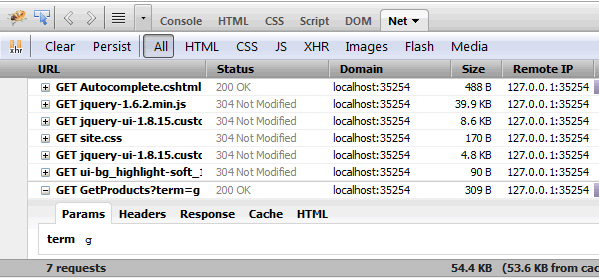
This is used as a parameter value with a wildcard appended so that any item in the Products table with a ProductName value that starts with "term" is selected and returned from the SQL query. At the moment that data is not much use for the Autocomplete widget, which expects JSON objects that have a label or value property, or both. In the sample code, I have used LINQ to Objects to project the result of the SQL query into a collection of anonymous objects with a property of label. I could have used an alias in the SQL instead:
@{
    var db = Database.Open("Northwind");
    var sql = "SELECT ProductName AS label FROM Products WHERE ProductName LIKE @0";
    var term = Request["term"] + "%";
    var result = db.Query(sql, term);

    Json.Write(result, Response.Output);
}
Either way, the data is JSON encoded using the JSON helper's Write method and sent to the browser:

And the widget displays the possible matches:
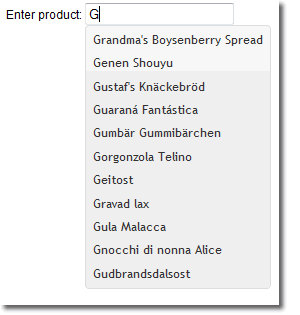
There are a range of options you can apply to the Autocomplete widget. For instance, the current sample fires a request on every keyup event. You can change that using the minLength option. Other options are detailed along with demos at the official documentation page.
The sample detailed above is available as a download
